
Google Budgeting App Mistake: Stop Before You Switch
Typing “google budgeting app” into search because Mint shut down or YNAB raised its price again? Google never built one — and the workaround most people reach for next is the actual mistake. Here’s what to do instead.

Updated September 2026 · 13 min read
Mint shut down in January 2024. YNAB now runs $109 a year. Copilot, Monarch, and Tiller all want a monthly card on file to do roughly what a spreadsheet already does. So a specific search has spiked: google budgeting app — people hoping Google quietly built a free, Google-owned answer to the apps that keep disappearing or getting more expensive.
It hasn’t. And that’s not actually bad news. Once you understand why the search leads nowhere, the real fix — and the mistake most people make right after finding that out — becomes obvious.
This post is a straight answer to the google budgeting app question, the honest trade-offs of the spreadsheet route, and a four-step plan for switching without repeating the same mistake twice.
Is there actually a google budgeting app?
Direct answer: No. Google has never released a standalone google budgeting app. Google Sheets has a built-in “Annual budget” template in its template gallery, and Google Pay/Wallet show basic spending totals, but neither is a dedicated budgeting system with categories, goals, or a monthly dashboard — you have to build that part yourself.
Here’s what actually exists under the Google umbrella, because the confusion is understandable. Open Google Sheets, click Template Gallery, and there’s a “Monthly budget” and an “Annual budget” template sitting right there. They’re real, they’re free, and they’re thin — a handful of static rows with no automation, no dashboard, and no category rollups. They answer the letter of “google budgeting app” but not the spirit of it.
Google Pay (formerly Google Wallet) is the other thing people stumble into. It shows a running list of transactions made through Google Pay specifically — not your full financial picture, since most spending never touches that wallet. It was never built to be a budgeting app, and Google has made no public move to turn it into one.
Is Google Pay a budgeting app?
No. Google Pay tracks payments made through Google Pay itself, not your total spending across cards, cash, or other apps. It has no category budgets, no monthly rollover logic, and no savings goals — it’s a payments log, not a budgeting system, so it can’t replace a dedicated google budgeting app substitute.
That leaves Google Sheets as the only genuinely flexible option inside the Google ecosystem — not because Google built it for budgeting, but because a spreadsheet can be shaped into almost anything, including a system that outperforms most paid apps once it’s set up correctly.
| What people find | Cost | Bank link required | Category budgets |
|---|---|---|---|
| Sheets template gallery (“Annual budget”) | Free | No | No — static rows only |
| Google Pay transaction history | Free | N/A (Google Pay only) | No |
| Third-party Sheets add-on | $4.99–$9.99/mo | Usually yes | Yes |
| Purpose-built free template | Free | No | Yes — 12–15 categories |
Laid out side by side, the pattern is obvious: the only option that’s both free and free of a bank-credential request is a purpose-built template — which is exactly the gap a proper google budgeting app replacement needs to fill.
Why the google budgeting app search keeps spiking
Search interest in a google budgeting app isn’t random — it tracks almost exactly with app pricing and shutdown news. Three things are driving the pattern right now.
Mint’s shutdown left a permanent scar. Intuit gave Mint users days, not months, to export years of transaction history before the app went dark in January 2024. Users weren’t offered a real replacement — they were redirected to Credit Karma, a credit-score product with no budgeting features at all. That event is still the single biggest driver of “what’s a free alternative that won’t disappear” searches two years later.
YNAB’s price has climbed steadily. It launched its subscription model at $45/year and now sits at $109/year — more than double in under a decade. The methodology (zero-based budgeting, giving every dollar a job) is genuinely good. The price of accessing it through YNAB specifically keeps pushing people toward a breakdown of free and lower-cost YNAB alternatives that apply the same method without the recurring bill.
Bank-linking fatigue is real. Copilot, Monarch, and most modern budgeting apps connect through Plaid or a similar aggregator, which means handing over read access to your bank login. Most people accept that trade without thinking about it. A meaningful minority don’t want a third party sitting between them and their bank account, no matter how reputable the aggregator is — and for them, “google budgeting app” is really shorthand for “something free that doesn’t need my bank password.”
Cost of a Google Sheets budget
Current YNAB subscription price
Bank credentials shared with a spreadsheet
Steps to switch without the common mistake
The real google budgeting app mistake — and the 3 ways people make it
Here’s the part most posts about this topic skip. Once someone learns there’s no official google budgeting app, they usually do one of two things: give up and sign up for another paid app, or open a blank Google Sheet and start typing numbers into columns. Both are the mistake. Neither one sticks past week three.
What’s the single biggest mistake when switching to a google budgeting app setup?
Trying to build the category list and the dashboard formulas from a blank sheet on day one. It’s the single biggest reason spreadsheet budgets get abandoned — copying a working structure first and customizing only 2–3 categories afterward takes minutes instead of hours and rarely breaks.
Can I create a budget in Google Sheets for free?
Yes, completely free, using only a Google account you likely already have. The catch isn’t cost — it’s setup time and structure. A blank sheet takes hours to turn into something usable; a proper template with categories, a dashboard, and formulas already built takes about 5–10 minutes to copy and start using.
What a proper google budgeting app replacement needs
If Google Sheets is going to function as a real google budgeting app substitute rather than a glorified list, it needs a specific structure — not just a single tab of numbers.
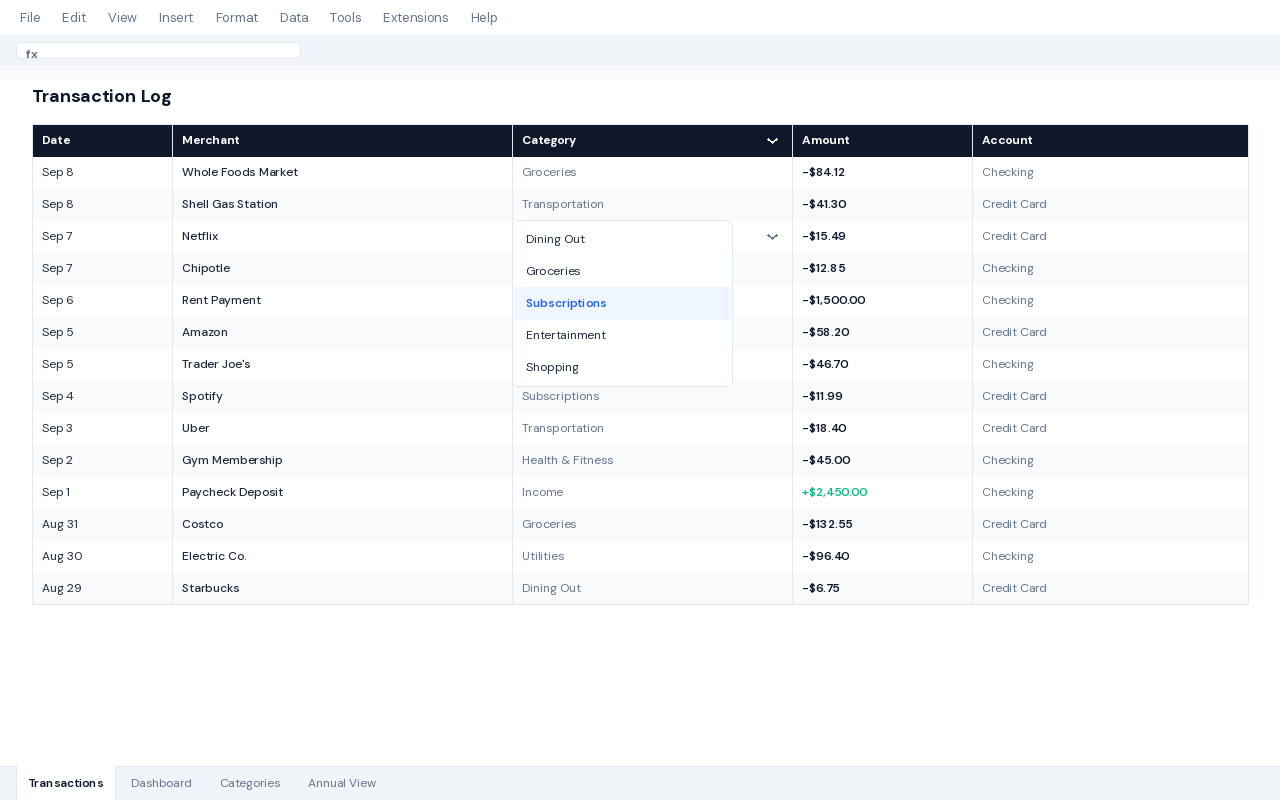
A transaction log with 12–15 fixed categories, not fewer. Fewer than 12 categories and “miscellaneous” swallows a third of your spending, hiding the exact leaks you’re trying to find. More than 15 and the dropdown becomes tedious to use daily. That range is the sweet spot most working templates settle on.
A dashboard built on SUMIFS, not manual addition. A formula like =SUMIFS(Transactions!C:C, Transactions!B:B, "Groceries", Transactions!A:A, ">="&DATE(2026,9,1)) pulls a live category total the instant you log a transaction — no monthly reconciliation required. This single formula pattern is what separates an automated dashboard from a static list.
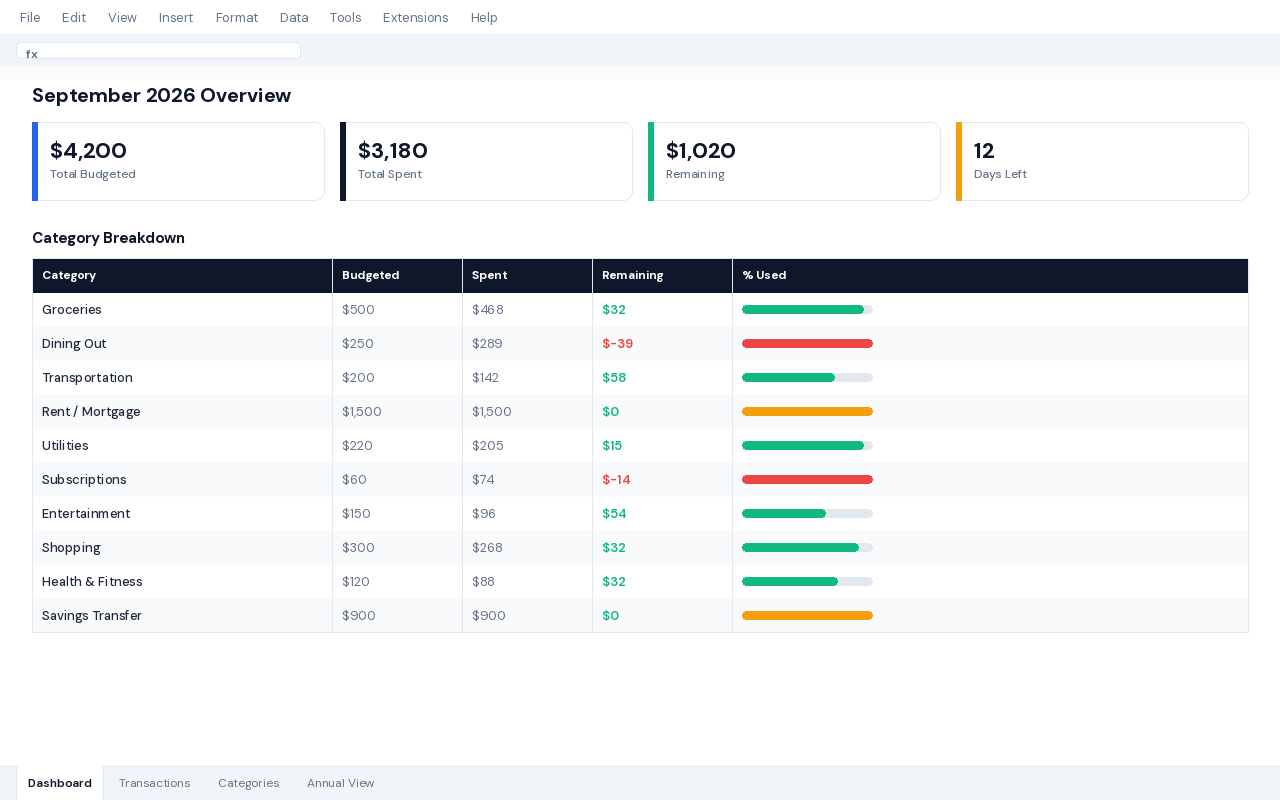
A monthly-vs-annual split. One tab per month gets unwieldy by June. A single Annual tab with 12 columns — one per month — feeding into a rolled-up dashboard lets you spot a pattern (like every December’s spike) that a month-by-month view hides completely.
Room to grow into related tracking. Once the core budget is running, most people add a net worth tracker to watch the bigger picture, or a debt payoff calculator if a card balance is part of the plan. Neither needs to be built from scratch — they can sit alongside the same budget file.
If you’d rather skip the formula-building entirely, the free Google Sheets budget tracker template ships with all of this already wired — categories, dashboard, and annual view included, no account or install required.
Honest trade-offs: when a real app still wins over a google budgeting app substitute
It would be dishonest to say Sheets wins every case. A google budgeting app search sometimes should end with a real app, and here’s exactly when.
Where a google budgeting app substitute genuinely loses: automatic bank-transaction import, push notifications when you’re near a category limit, and a polished one-tap mobile logging experience. If any of those three are the actual reason you’d stick with a budget, a paid app will outperform a spreadsheet — no template fixes that gap.
Concretely: if you’ve tried manual logging three separate times and abandoned it within two weeks each time, a spreadsheet isn’t the fix — the friction is the problem, and an app that auto-imports transactions removes it entirely. That’s not a moral failing; it’s just knowing which tool matches your actual behavior instead of your intended behavior.
Freelancers and people with irregular income sit in a middle zone. A standard monthly budget breaks down fast when income varies by 40% month to month — which is exactly why a dedicated cash flow forecast tracker exists as a separate layer on top of the base budget, built specifically for that variability. The same goes for anyone billing clients directly: a freelance invoice tracker or freelance expense tracker solves a problem a generic budgeting app was never designed to handle.
If your actual need is a full personal finance system — budget, net worth, and goals in one place, not just a category tracker — a dedicated Personal Finance OS built in Google Sheets covers that ground without asking for a monthly fee either.
One edge case worth naming: shared household budgets. Two incomes hitting one sheet means category ownership gets ambiguous fast — “Groceries” paid from either card, split unevenly. The fix isn’t a fancier google budgeting app search, it’s adding a single “Paid by” column next to the category field, so a quick SUMIFS by person answers the fairness question without a single extra tab.
The 4-step switch plan: avoiding the google budgeting app mistake
This is the sequence that turns a google budgeting app search into an actual working system, and avoids all three mistakes above. It takes under an hour total, spread across one sitting.
Skip the setup — get the Budget Tracker Pro
AI-assisted CSV categorization, a FIRE calculator, financial health score, and an investment tracker layered on top of the same google budgeting app replacement structure covered above.
Effective price today: $8.42 (15% off, applied automatically at checkout)
Get Budget Tracker Pro — $9.90 →
| Feature | Free | Pro |
|---|---|---|
| Transaction log + 12–15 categories | ✓ | ✓ |
| Auto-updating dashboard | ✓ | ✓ |
| Annual view (12 months) | ✓ | ✓ |
| AI CSV categorization | — | ✓ |
| FIRE calculator + health score | — | ✓ |
| Investment tracker tab | — | ✓ |
Prefer to start free?
The no-account, no-signup Google Sheets budget tracker has the transaction log, dashboard, and annual view described above — everything needed to close the google budgeting app search for good.
Frequently asked questions about the google budgeting app search
Is there a real google budgeting app I’m missing?
No — Google has never released a dedicated budgeting app. The closest official options are the static “Monthly budget” and “Annual budget” templates in the Google Sheets template gallery, and Google Pay’s basic transaction list, neither of which offers category budgets, goals, or a real dashboard on its own.
Can I link my bank account to Google Sheets for automatic imports?
Not natively, and that’s by design — Sheets has no bank-linking feature built in. Some third-party add-ons offer it through a Plaid-style connection, but that reintroduces the exact bank-credential sharing most people are trying to avoid by searching for a google budgeting app in the first place.
Is Google Sheets safe enough to replace a budgeting app?
Yes, for the data itself — your spreadsheet lives inside your Google account, protected by the same security as your Gmail, with no bank credentials shared with any third party. The main safeguard on your end is a strong password and two-factor authentication on the Google account holding it.
How much does a google budgeting app replacement actually cost?
Nothing, if you build or copy a free template — Google Sheets itself is free with any Google account. A pre-built Pro template with automation like AI categorization is a one-time cost (currently $9.90), which is less than one month of most subscription budgeting apps.
What’s the fastest way to migrate from Mint or YNAB to Google Sheets?
Export your last 90 days of transactions as a CSV from your bank, copy a pre-built budget template rather than starting from a blank sheet, paste the CSV into an import tab, and set one weekly calendar reminder to review it — the full process takes under an hour.
Does a Google Sheets budget work as well as an app on mobile?
It works, but it’s not a dedicated mobile experience — the Google Sheets app supports offline editing on iOS and Android, so you can log a transaction anywhere, but you won’t get push notifications or one-tap category buttons the way a purpose-built budgeting app provides.
Alex builds free and Pro no-code templates for Google Sheets and Notion, focused on tools people actually keep using past the first week.